🏔️ 3D Surface
The 3D Surface view turns gamma exposure into an interactive, rotatable 3D terrain — strike on one axis, expiry on another, and GEX as the height of the landscape. The shape of dealer positioning becomes obvious at a glance: where exposure concentrates, where skew builds, and which strikes form the tallest hedging walls. Rotate, zoom, and hover to read the full picture for the current ticker from any angle.
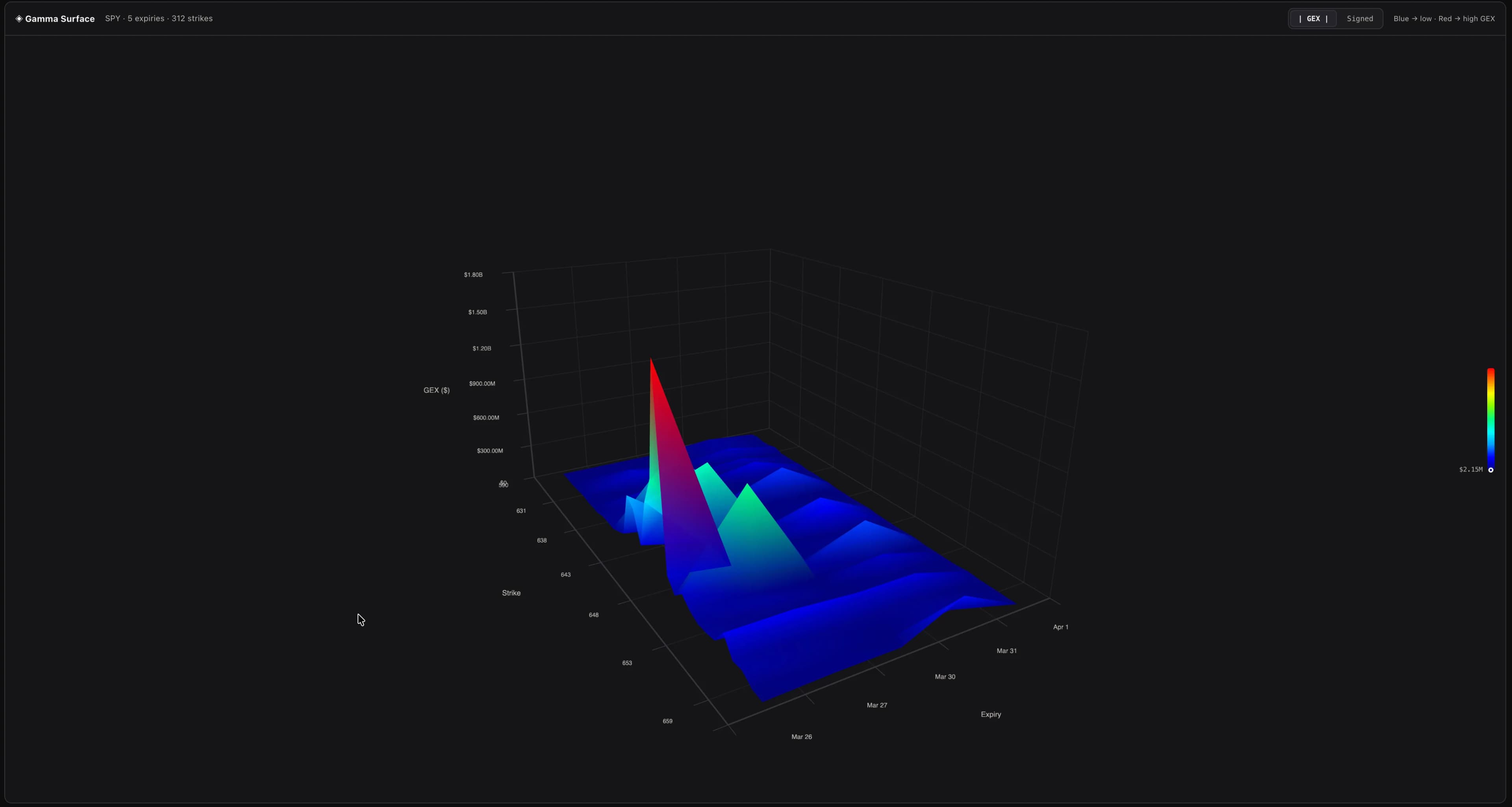
The Three Axes#
- X-axis: Strike Price — Runs from the lowest to highest strike in the visible range. Strikes with negligible GEX (below 2% of the global max) are filtered out to keep the surface focused on meaningful levels.
- Y-axis: Expiration Date — Nearest expirations at the front, furthest at the back. Each step represents one expiration date in the options chain.
- Z-axis: GEX Value — The height of the surface at each point represents the gamma exposure for that strike/expiry combination. Taller peaks = higher GEX magnitude.
Display Modes#
Toggle between two visualization modes:
- Absolute Mode — Shows the absolute value of GEX. All peaks point upward. This makes it easy to spot the highest concentrations regardless of whether they're from calls (positive) or puts (negative).
- Signed Mode — Shows positive and negative GEX as the raw signed values. Positive GEX (calls) rises above the baseline, while negative GEX (puts) drops below it. This reveals the directional balance at each point.
Colors#
The surface is color-coded based on GEX value:
- Blue / cool tones — Positive GEX (call gamma dominance). These areas represent dealer stabilization zones.
- Red / warm tones — Negative GEX (put gamma dominance). These areas represent potential amplification zones.
- Intensity — Darker/more saturated colors indicate higher GEX magnitude. Lighter areas have less exposure.
Interacting with the Surface#
- Rotate: Click and drag to rotate the surface in 3D space
- Zoom: Scroll to zoom in/out
- Hover: Point at any area to see a tooltip with detailed data for that strike/expiry
The tooltip shows:
- GEX value in dollar terms
- Total premium at that strike/expiry
- Open interest (call vs. put breakdown)
- Day volume
- Notional exposure
- OI-weighted Call IV and Put IV
- Delta for the call and put contracts
What to Look For#
- Tall peaks near the current price — High GEX concentration at nearby strikes means strong dealer hedging pressure in the immediate price neighborhood. These are the levels that have the most intraday impact.
- Peaks at near-term expirations (front of the surface) — Near-term options have higher gamma, so these peaks represent the most active hedging zones. They change significantly after each expiration.
- A ridge running across expirations at one strike — Multiple expirations aligned at the same strike creates a persistent level. This is often a very strong GEX wall.
- Valleys between peaks — Low-GEX zones between high-GEX strikes are areas where dealer hedging pressure is minimal. Price may move more freely through these zones.
Theme Support#
The 3D Surface automatically adapts to your current theme — light or dark mode. The axis labels, grid lines, and background adjust for optimal readability in both themes.