📊 Multi Heatmap
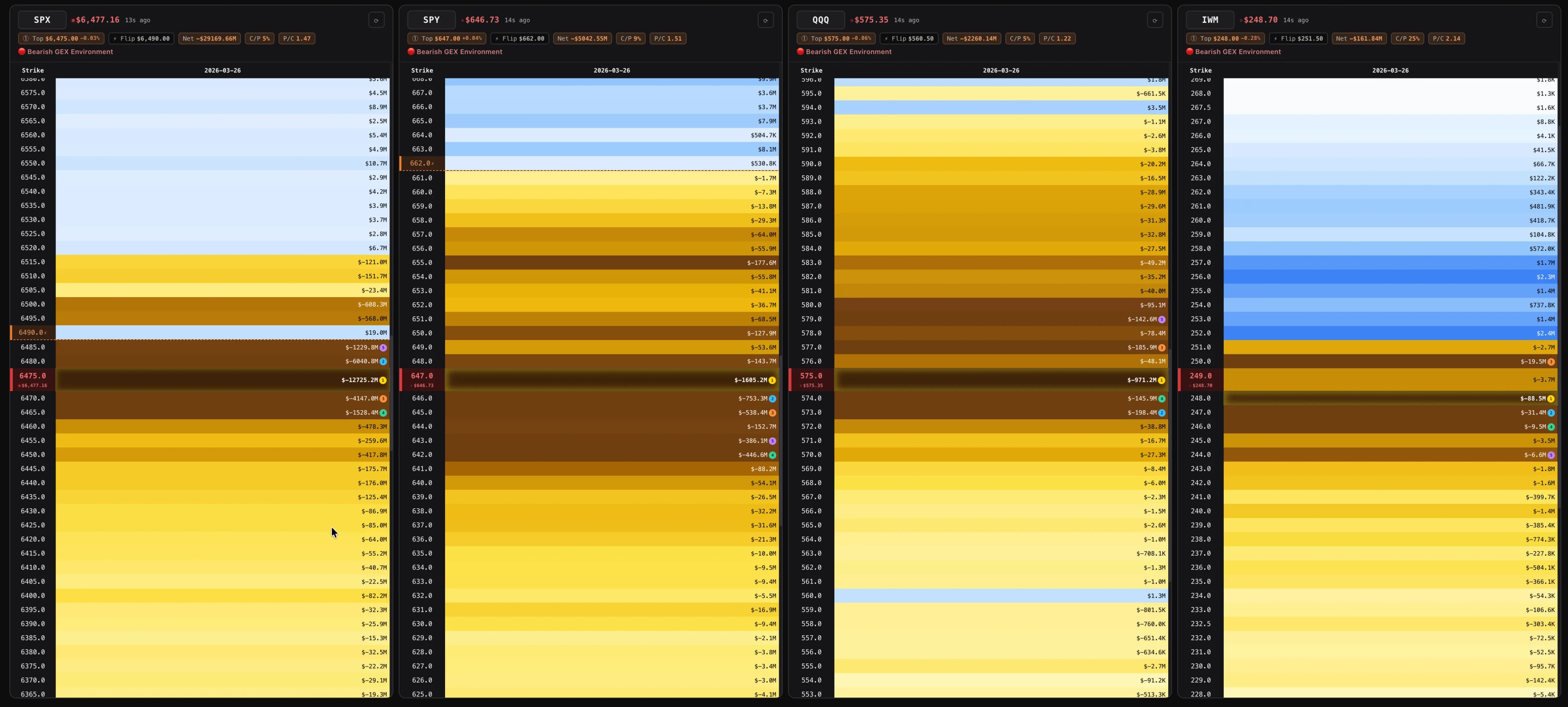
The Compare view puts several GEX heatmaps side by side in a single grid so you can read the whole market at once. Each ticker gets its own card with a gamma-regime label, King Strike, gamma flip, and a compact GEX profile — making it easy to spot relative positioning and divergences across indices, sectors, and individual names.
Default Tickers#
Compare launches with four default tickers: SPX, SPY, QQQ, and IWM. These give you an instant snapshot of the broad market's GEX landscape across large-cap, tech-heavy, and small-cap indices.
You can replace any of these with your own tickers to compare any combination of US stocks and ETFs.
Adding & Removing Tickers#
- Add a ticker — Type a symbol in the input field at the top of the Compare view and press Enter or click the add button. The ticker is fetched and a new card appears in the grid.
- Remove a ticker — Click the ✕ button on any ticker card to remove it from the comparison.
- There's no hard limit on the number of tickers, but performance is best with 4–8 tickers.
What Each Card Shows#
Every ticker card in the Compare view displays a condensed GEX profile:
- Ticker & spot price — Current price with change percentage.
- King Strike — The primary GEX node with distance from current price.
- Gamma Flip — The price where net GEX transitions from positive to negative.
- Net GEX bar — Visual bar showing the total GEX direction and magnitude.
- Summary metrics — GEX Ratio, Net GEX, P/C OI, and other key indicators in compact badge format.
- Strike profile — A mini GEX-by-strike bar chart showing the distribution of gamma across price levels.
Layout Options#
Toggle between two layout modes:
- Horizontal — Cards arranged side by side in a row. Good for comparing 2–4 tickers on a wide screen.
- Vertical — Cards stacked vertically. Good for more tickers or narrower screens.
Auto-Refresh#
Compare supports auto-refresh with configurable intervals — from every 15 seconds to every 15 minutes. A countdown timer shows when the next refresh will occur. All tickers refresh simultaneously.
Each card shows a data age indicator — how many seconds since the last successful fetch. If data becomes stale (e.g., network issue), the age turns red to alert you.
Use Cases#
- Index comparison — SPY vs QQQ vs IWM: are all three in positive or negative GEX? Is one index diverging?
- Sector rotation — Compare sector ETFs (XLF, XLE, XLK) to see where gamma is concentrated across sectors.
- Relative positioning — Compare two or more individual stocks to see which has the King Strike closest to its current price, which has the highest GEX Ratio, etc.
- Pre-earnings scan — Compare tickers reporting earnings this week to observe their GEX profiles before the event.