🔭 Option Flow
Option Flow scans the entire option chain and surfaces the specific contracts that are moving — not which tickers are busy, but which exact strikes and expiries are seeing open interest pile up, gamma shift, or volume spike. Choose a scan mode, set one or more time horizons, narrow the universe with filters, and read the results in a fast, sortable table. It answers a precise question: across thousands of symbols, where in the chain is something happening right now?
What Option Flow Shows#
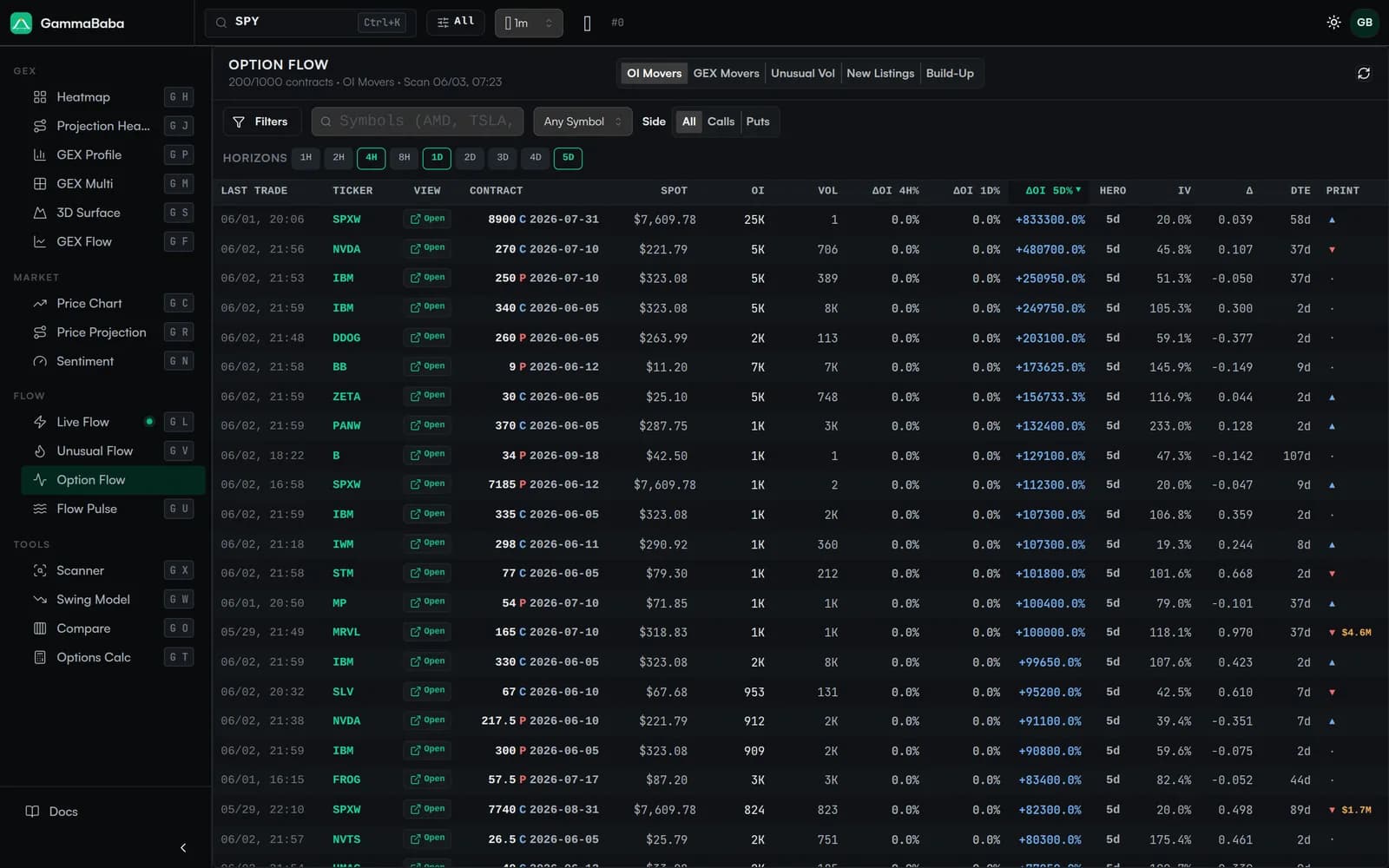
Most flow tools tell you a ticker is active. Option Flow goes one level deeper: it ranks individual contracts — a strike, an expiry and a side — by how much they have changed over a chosen window. Each row is one contract, so you can see that, for example, the 270 calls expiring next Friday added the most open interest in the last day, rather than just learning that the underlying was busy.
The table is built for breadth. The header shows the active scan, the contract count and limit (for example, 200 of 1000 contracts), and the timestamp of the scan, so you always know what slice of the chain you are looking at.
Scan Modes#
A row of mode tabs sits at the top. Each mode re-ranks the same chain by a different signal, so switching modes is the fastest way to change the question you are asking:
- OI Movers — contracts with the largest change in open interest over the window. New positions opening or closing show up here first, making it a direct read on where fresh exposure is being built.
- GEX Movers — contracts whose gamma exposure has shifted the most. Useful for spotting where the dealer-hedging picture is changing strike by strike, before it reshapes the wider profile.
- Unusual Vol — contracts trading at volume that stands out relative to their own footprint. A volume burst with little standing open interest can flag a brand-new interest in a strike.
- New Listings — contracts that have recently appeared in the chain, such as freshly listed strikes or expiries. Handy for catching activity in newly opened tenors.
- Build-Up — contracts steadily accumulating open interest, where exposure is being added consistently rather than in a single spike.
Time Horizons#
Change is always measured over a window, and Option Flow lets you pick from 1H, 2H, 4H, 8H, 1D, 2D, 3D, 4D and 5D. You can enable up to four horizons at once, and the table adds a change column for each — for instance ΔOI 4H%, ΔOI 1D% and ΔOI 5D% side by side.
Filters & Universe Controls#
Because the scan spans the whole market, the filters are what make the output yours. They are designed to narrow thousands of contracts down to the slice you actually trade:
- Side — All, Calls or Puts, to focus on one direction of positioning.
- Symbols box — an include/exclude text field. List the tickers you want, and prefix with
!to exclude one. For exampleAMD, !SPYincludes AMD and keeps SPY out. - Saved watchlists — scan only the names you track instead of typing them each time.
- Universe exclusions — quickly drop whole groups such as the Mag7, Indexes, ETFs or VIX so a handful of mega-caps or index products don't crowd out everything else.
- Per-symbol and row limits — cap how many contracts a single ticker can contribute and how many rows the scan returns, so one hyperactive name can't dominate the list.
Reading the Table#
The results table is virtualized, so it stays responsive even with long lists. Each row describes one contract and its change. The columns give you the full context at a glance:
- Last Trade — when the contract last printed, and Ticker / Contract — the underlying and the exact strike, side and expiry (e.g. 270 C 2026-07-10).
- Spot, OI and Vol — the underlying price, current open interest and session volume for the contract.
- Change columns — one per active horizon (ΔOI 4H%, ΔOI 1D%, ΔOI 5D%, and so on), the heart of the scan. Sort by any of them to push the biggest movers to the top.
- IV, Δ and DTE — implied volatility, delta and days to expiration, so you can judge how aggressive and how near-dated a move is.
- View / Open — jump straight to that ticker's analysis to see the move in the context of the full chain.
How It Differs From Related Tools#
GammaBaba has several flow views, and they answer different questions. Knowing which to reach for saves time:
| Tool | Granularity | Answers |
|---|---|---|
| Option Flow | Contract-level | Which exact strikes and expiries are moving |
| Unusual Flow | Ticker-level | Which symbols stand out as a whole |
| Live Flow | Trade-level | Each individual print as it crosses the tape |
Reach for Option Flow when you already suspect activity and want to know precisely where in the chain it sits, then open the ticker to see that contract against the wider gamma picture.
A Simple Workflow#
A practical way to start each session:
1. Pick a mode      → OI Movers to find new positioning
2. Enable horizons → 1D + 5D to separate spikes from build-up
3. Trim the universe → exclude Indexes / ETFs, or load a watchlist
4. Sort by a Δ column → push the biggest movers to the top
5. Open a contract  → review it inside the full chain
From there, switch to GEX Movers to see whether those same names are also reshaping dealer gamma, or to Unusual Vol to catch fresh interest that has not yet built open interest. The modes are fast to flip between, so treat them as different lenses on the same scan rather than separate tools.