🎯 Price Projection
Price Projection takes the gamma structure you already study on the heatmap and extends it forward in time. It draws a magnet path — the chain of strikes price is most likely to gravitate toward, one expiration at a time — and wraps it in a probability cone that shows how wide the range of plausible outcomes stays as you look further out. It is forward-looking and probabilistic: a map of where hedging gravity could pull price, not a forecast of where it will go.
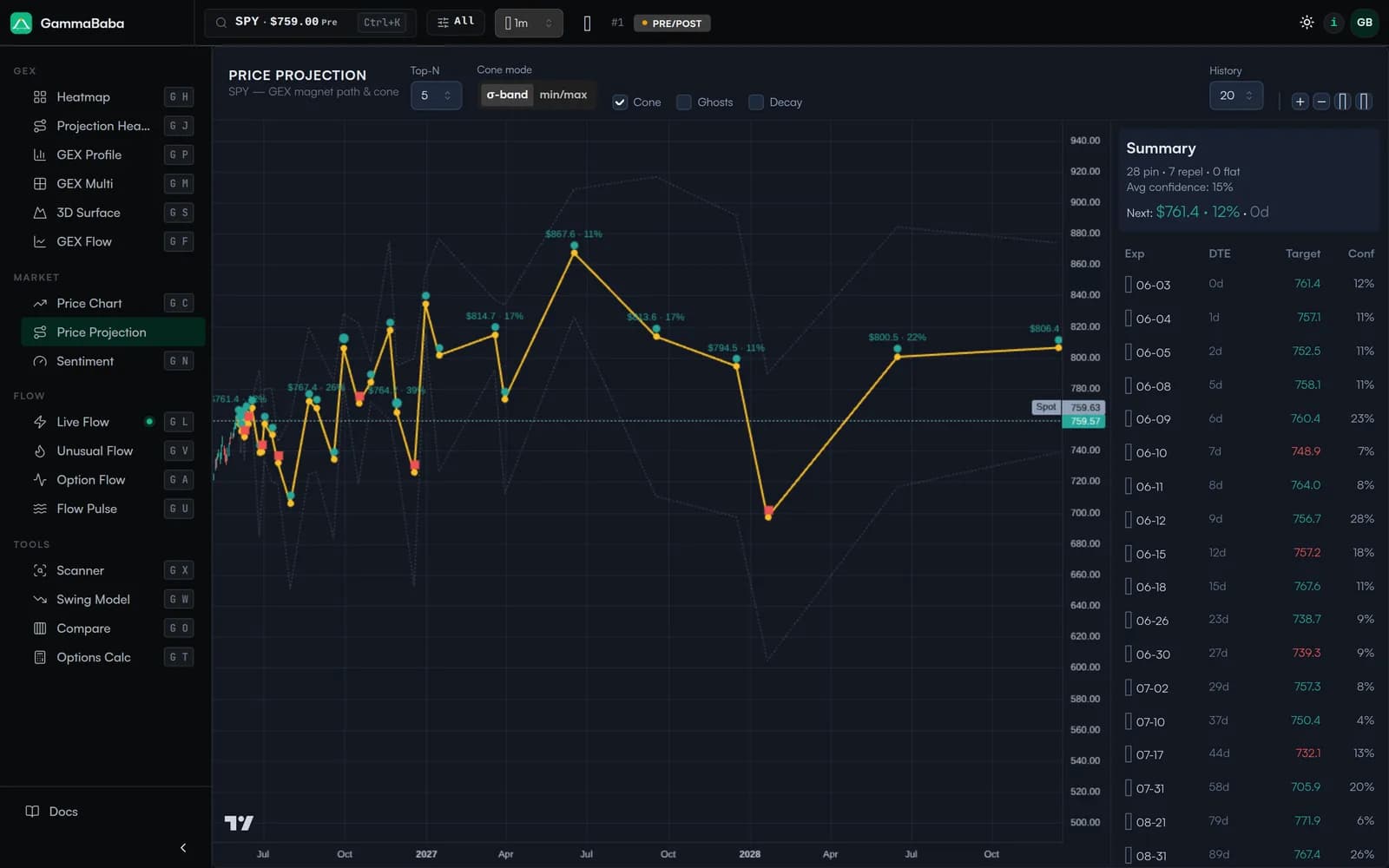
What the Chart Shows#
The view stitches together one target per upcoming expiration and connects them into a single path that reads left to right across future dates:
- Magnet path — the solid line linking each expiry's most likely magnet. Markers sit at every expiration, so you can see whether the path drifts up, fades down, or coils sideways as time passes.
- Probability cone — the shaded band around the path. It widens with time, reflecting that the further out you look, the less concentrated the gravity and the wider the plausible range.
- Spot reference — the current price line, so every projected target can be read as a distance above or below where the underlying trades right now.
Each labeled point carries its projected level and a percentage, and the markers are color-coded by whether a strike tends to attract price (a pin) or repel it. The result is a positioning map drawn over the time axis instead of the strike axis.
Reading the Summary Table#
The panel on the right turns the visual path into numbers you can act on. Each row is one expiration, sorted from nearest to furthest, with these columns:
- Exp — the expiration date the row projects toward.
- DTE — days to expiration. Nearer-dated rows generally carry tighter, higher-conviction magnets; far-dated rows are looser.
- Target — the projected magnet level for that expiry, the same value plotted on the path.
- Conf — a confidence score for how concentrated the gamma is around that target relative to the surrounding strikes. Higher means a more dominant magnet.
A header summary tallies how many expirations lean toward pinning versus repelling and reports the average confidence and the next expiry's target at a glance. Read confidence as relative weight, not certainty — a high score means the structure is concentrated today, not that price is obligated to reach it.
The Controls#
A small set of controls lets you tune how aggressive or conservative the projection is:
- Top-N magnets (3 / 5 / 7 / 10) — how many of the strongest strikes are considered as candidate magnets at each expiry. A low Top-N keeps the path focused on the few dominant levels; a higher Top-N widens the field and surfaces secondary magnets.
- Cone mode (σ-band vs min/max) — choose whether the cone is drawn as a statistical σ-band around the path or as the absolute min/max envelope of the candidate magnets. The σ-band gives a smoother, probability-weighted range; min/max shows the full outer bounds.
- Projection cone (on / off) — toggle the shaded band entirely. Turn it off when you want an uncluttered view of just the magnet path.
- Ghost paths — overlay earlier projection paths from a chosen lookback window, so you can see how the projected path has been shifting over recent days. A path that holds steady across ghosts is more stable than one that lurches each session.
- Decay model — applies a half-life weighting (with its own lookback) so that how often a strike has been touched recently counts more than stale history. It biases the projection toward levels that are currently active rather than ones that mattered weeks ago.
- History lookback — sets how much recent data feeds the ghosts and decay weighting, trading responsiveness against stability.
How It Differs From the Heatmap and Chart View#
The heatmap and GEX profile answer "where is the gamma right now?" across strikes. Price Projection answers a different question — "if that gamma keeps pulling, where might price sit at each expiry?" — by collapsing the strike-by-strike structure into a single expected level per date and laying it out on the time axis.
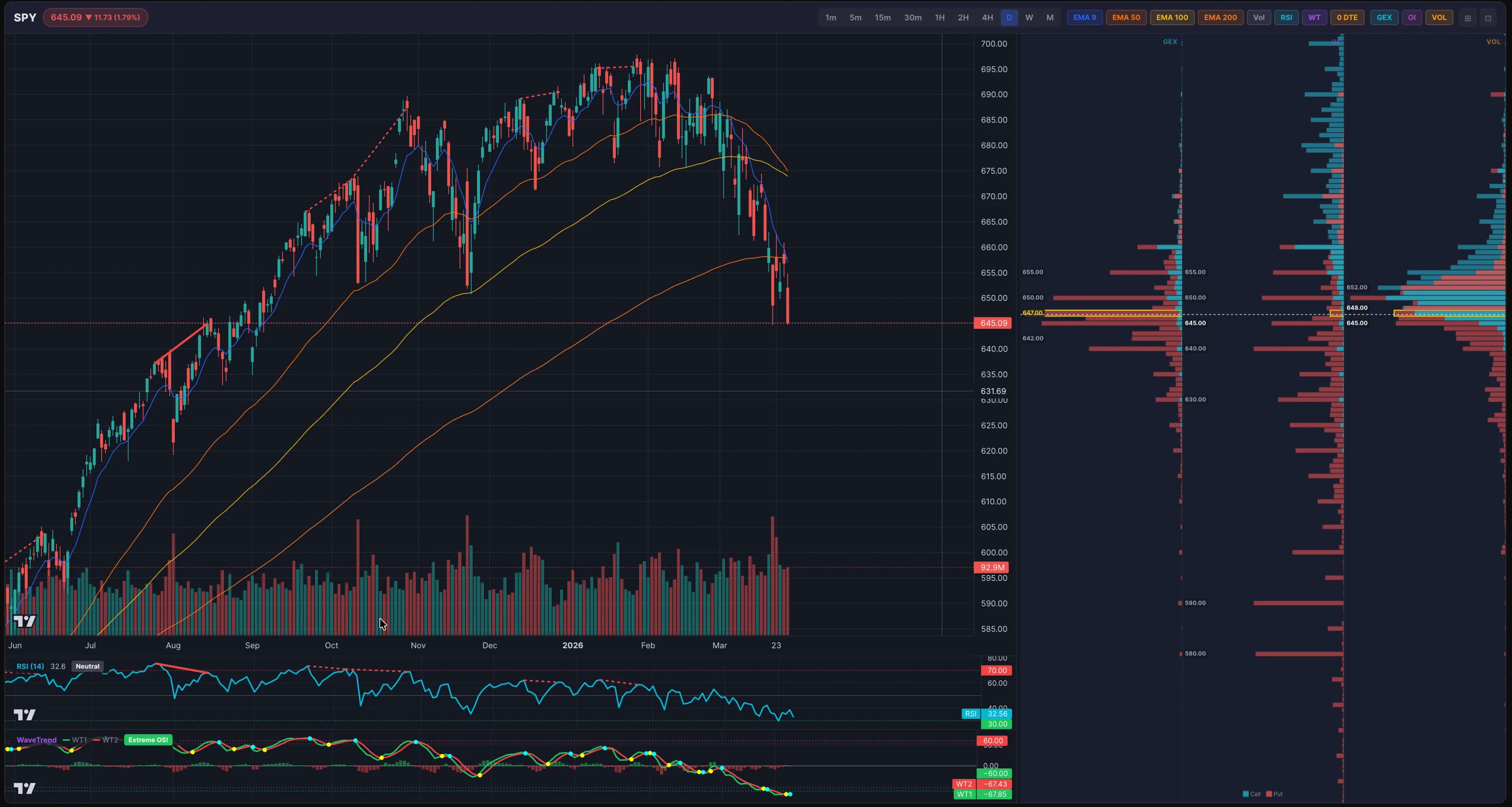
It pairs naturally with Chart View, where the same GEX levels appear as horizontal overlays on the live price chart alongside strike-by-strike GEX, open interest and volume side profiles. Chart View shows the static levels in the present; Price Projection sequences them into a forward path. Confirm a projected target against the overlaid levels and the side profiles before leaning on it.
How to Use It#
A simple workflow keeps the tool honest:
- Anchor on the near expiry. The first one or two rows — lowest DTE, usually highest confidence — are where the magnet effect is most mechanical. Note the target and its distance from spot.
- Read the slope. An upward-drifting path with rising confidence frames a constructive bias; a path sagging toward lower strikes frames a cautious one. A flat path clustered near spot points to a pinning, range-bound expectation.
- Respect the cone width. When the cone fans out quickly, treat far-dated targets as rough zones rather than precise levels.
- Check stability with ghosts. If recent ghost paths overlap tightly, the projection is steady; if they scatter, positioning is in flux and the path deserves less weight.